
Bước 1: Mở Registry Editor
- Nhấn Win + R → gõ
regedit→ Enter.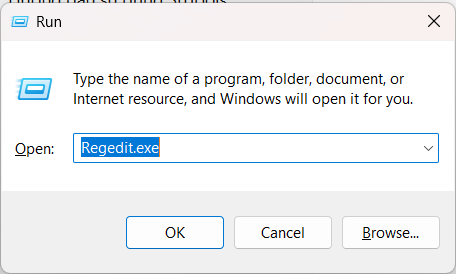
- Vào đường dẫn:
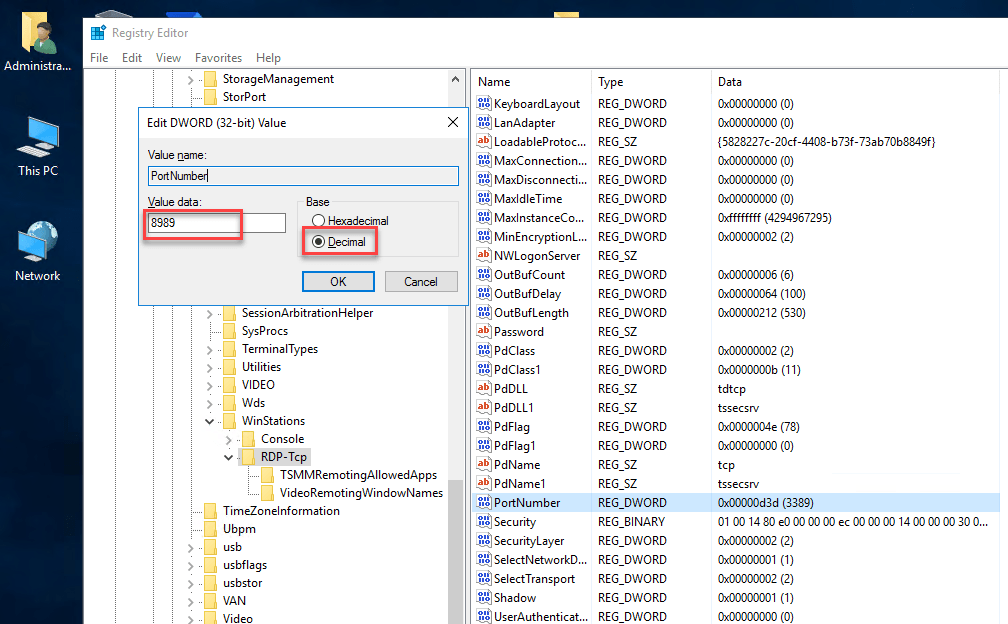
HKEY_LOCAL_MACHINE\System\CurrentControlSet\Control\Terminal Server\WinStations\RDP-Tcp - Ở bên phải, tìm giá trị PortNumber.
Bước 2: Chỉnh port
- Double-click vào PortNumber.
- Chọn Decimal để dễ nhập.
- Nhập số port bạn muốn (ví dụ
3390). - Bấm OK và đóng Registry Editor.
Bước 3: Mở port trên Windows Firewall
- Vào Control Panel → Windows Defender Firewall → Advanced settings.
- Chọn Inbound Rules → New Rule.
- Chọn Port → Next.
- Nhập port mới (ví dụ 3390) → Next.
- Chọn Allow the connection → Next → đặt tên rule → Finish.
Bước 4: Restart dịch vụ hoặc máy
- Mở Services.msc, tìm Remote Desktop Services → Restart.
- Hoặc restart máy cho chắc.
Bước 5: Kết nối bằng port mới
Khi remote, nhập theo cú pháp:
mstsc
Computer: <IP hoặc hostname>:<port>
Ví dụ:
192.168.1.100:3390